 Talk
TalkThe best AI coding assistants for small teams (2026)
Our top pick for a small team buying its first AI coding assistant is GitHub Copilot Business, because at $19 per seat with 1,900 pooled AI credits and a published overage of $0.01 per credit it is the only tool in this cluster whose annual cost a finance lead can write down. Kiro is the pick for VS Code teams that want an agent-first editor with a stated credit count at $20 per developer. Cursor is the pick for teams already organised around agents who can budget from the vendor's own $60 to $100 per user estimate rather than the $40 sticker. Grades come from pricing pages, documentation, privacy pages and Trustpilot checked October 10, 2026, not from running any of the three; see [how we picked](#how-we-picked).
Our picks
- Best default for a small team: GitHub Copilot
- Best for VS Code teams that want a stated meter: Kiro
- Best agent toolset, hardest to budget: Cursor
The picks at a glance
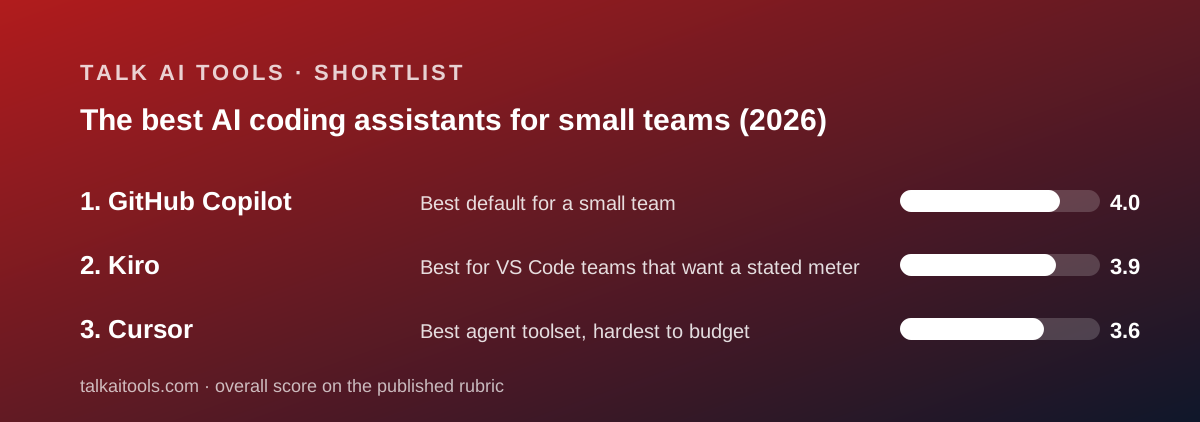
Three coding assistants are graded in this cluster, and the ranking turns on one question: does the vendor tell you what the seat includes? Two do; one does not. The feature gap between them is real but smaller than the pricing gap.
- Best default for a small team: GitHub Copilot - Business $19/seat/mo, 1,900 pooled credits per user, $0.01 per credit beyond, policy controls and IP indemnity at the entry price. Overall 4.0.
- Best for VS Code teams that want a stated meter: Kiro - Pro $20/user/mo for 1,000 credits, add-ons $0.04, spec mode, Code OSS base. Overall 3.9.
- Best agent toolset, hardest to budget: Cursor - Teams Standard $40/user/mo, included usage not published, vendor estimates $60 to $100 per daily user, SSO and enforced privacy mode on Teams. Overall 3.6.
Prices and limits side by side (as of October 2026)
All figures are from the vendors' pricing pages and documentation checked October 10, 2026. None of the three publishes an annual price, so yearly totals on this page are twelve months at list, our arithmetic.
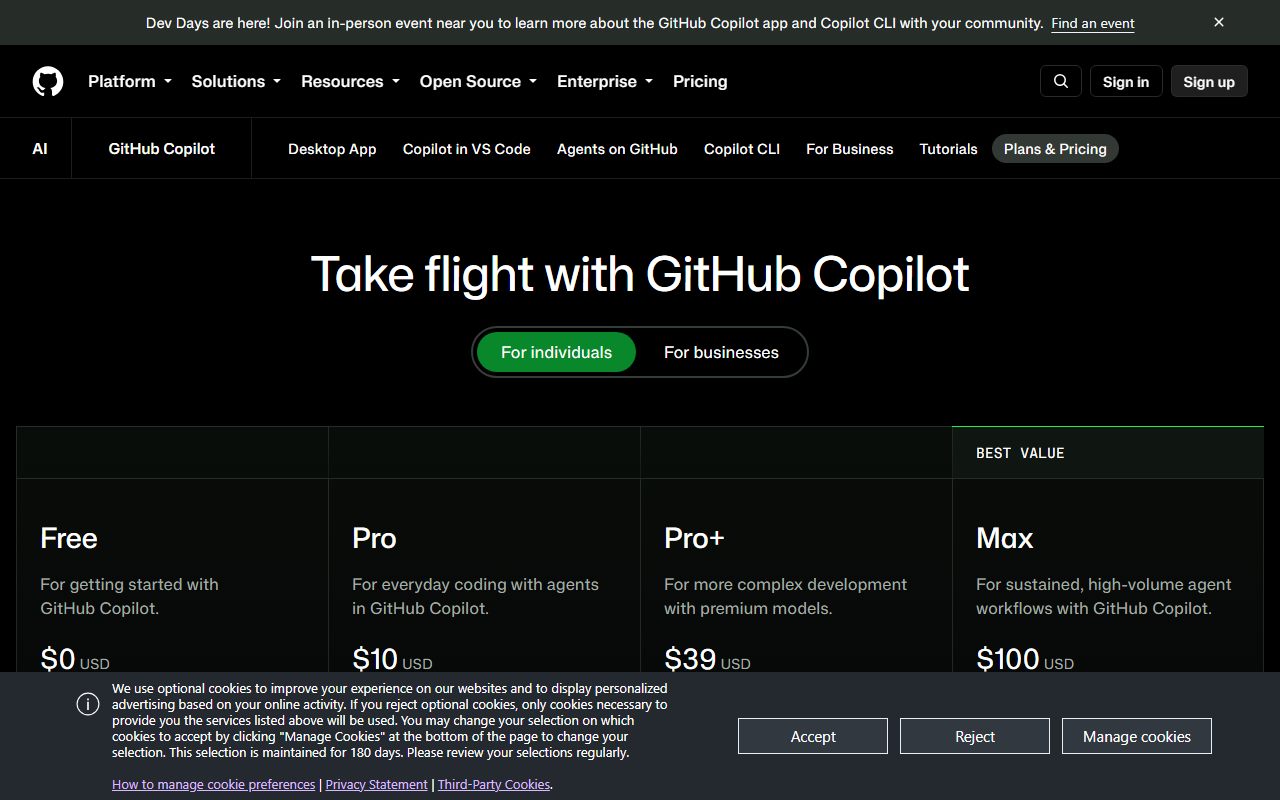
- Entry team price: Copilot Business $19/seat; Kiro Pro $20/user; Cursor Teams Standard $40/user.
- Included allowance: Copilot 1,900 credits per user, pooled; Kiro 1,000 credits per developer, not pooled; Cursor not published.
- Overage: Copilot $0.01 per credit with an admin budget; Kiro $0.04 per add-on credit in packs from $5; Cursor model list price in arrears, rate not on the pricing page, plus $0.25 per million tokens on Auto third-party routes.
- Ten-person floor per year: Copilot $2,280; Kiro $2,400; Cursor $4,800. Cursor's vendor estimate applied to ten daily users: $7,200 to $12,000.
- Free plan: Copilot 2,000 completions and 50 chats a month; Kiro 50 credits a month; Cursor Hobby with limited agent requests, no number.
- Form factor: Copilot extension for VS Code, JetBrains, Visual Studio, Neovim, CLI, Mobile; Kiro editor on Code OSS; Cursor editor forked from VS Code.
- Governance at entry team tier: Copilot policy management, audit logs, content exclusion, IP indemnity; Kiro none below Enterprise; Cursor SAML/OIDC SSO and team-wide privacy mode.
- Training on your code: Copilot IP indemnity and data privacy listed, trust page unread; Kiro not on paid IAM-authenticated plans, maybe on free and social login; Cursor not with privacy mode on, maybe with it off.
- Trustpilot: Copilot no own listing; Kiro no listing found; Cursor 1.5 from 342 reviews.
How we picked
We did not run tests of our own; grades come from documentation, pricing pages and verified user reports checked on October 10, 2026. Each tool is scored out of 5 on ease, features, value and support, weighted equally, and the scores below are those from the three full subject pages linked above.
Ease counts adoption friction, not interface polish. We did not assess how the editors feel. We counted whether a team must change editors, whether the free plan has stated limits, and how many pages a buyer must read to understand the invoice.
Features counts what is on the pricing page and in the documentation. Agent capabilities, cloud agents, code review, model choice and the governance layer at the entry team tier all had to be written down to be scored.
Value counts the published allowance against the published price. A missing allowance is scored as a missing number, not estimated. A missing overage rate is penalised. A vendor's own spend estimate, where it exists, is used as the realistic budget.
Support counts what is promised and what verified reviewers report. None of the three publishes response times for small-team plans, so Trustpilot carried weight where it existed and absence was noted where it did not.
One tool was dropped during research. Windsurf's pricing page and homepage both redirected to devin.ai on October 10, 2026, and the destination pricing page returned a 404. We do not grade a product whose current terms we cannot read, so it is excluded until a readable pricing page exists.
Best default for a small team: GitHub Copilot
Copilot earns the top spot by being legible and governed at $19. The plans page and plans documentation checked October 10, 2026 state that Business includes 1,900 AI credits per user per month, pooled across the organisation, with usage beyond the pool at $0.01 per credit and a $10 budget covering 1,000 credits. Completions are unlimited and not metered.
At the same price Business includes organisation-wide policy management, audit logs, content exclusion by file, IP indemnity and web-based support, per the features page and plans documentation. No other tool here puts that governance set on its entry team tier.
The free plan has stated limits, 2,000 completions and 50 chats a month, and the individual Pro plan at $10 states 1,500 credits. The model catalogue lists Anthropic, OpenAI, Google, xAI and Kimi models on every plan.
The weaknesses are real. There is no annual price. Third-party agents such as Claude and OpenAI Codex are listed on Pro+ at $39 and above, not Business. GitHub does not publish how many credits a chat, agent session or code review consumes, so the one-cent rate is precise about the unit and vague about the quantity.
Content exclusion does not yet apply in VS Code's edit and agent modes. And the Copilot trust page, which holds the training and retention statement, returned no readable text on the day we checked.
Why it sits at #1. For a small company the deciding feature of a coding assistant is whether the bill can be forecast and capped. Copilot's can, inside an account the company already administers, with the controls a compliance reviewer will ask about. Kiro matches the legibility and Cursor beats the features, but neither matches both at once at $19.
Read our full GitHub Copilot review. Deciding between Copilot and Cursor? Read Cursor vs GitHub Copilot.
Best for VS Code teams that want a stated meter: Kiro
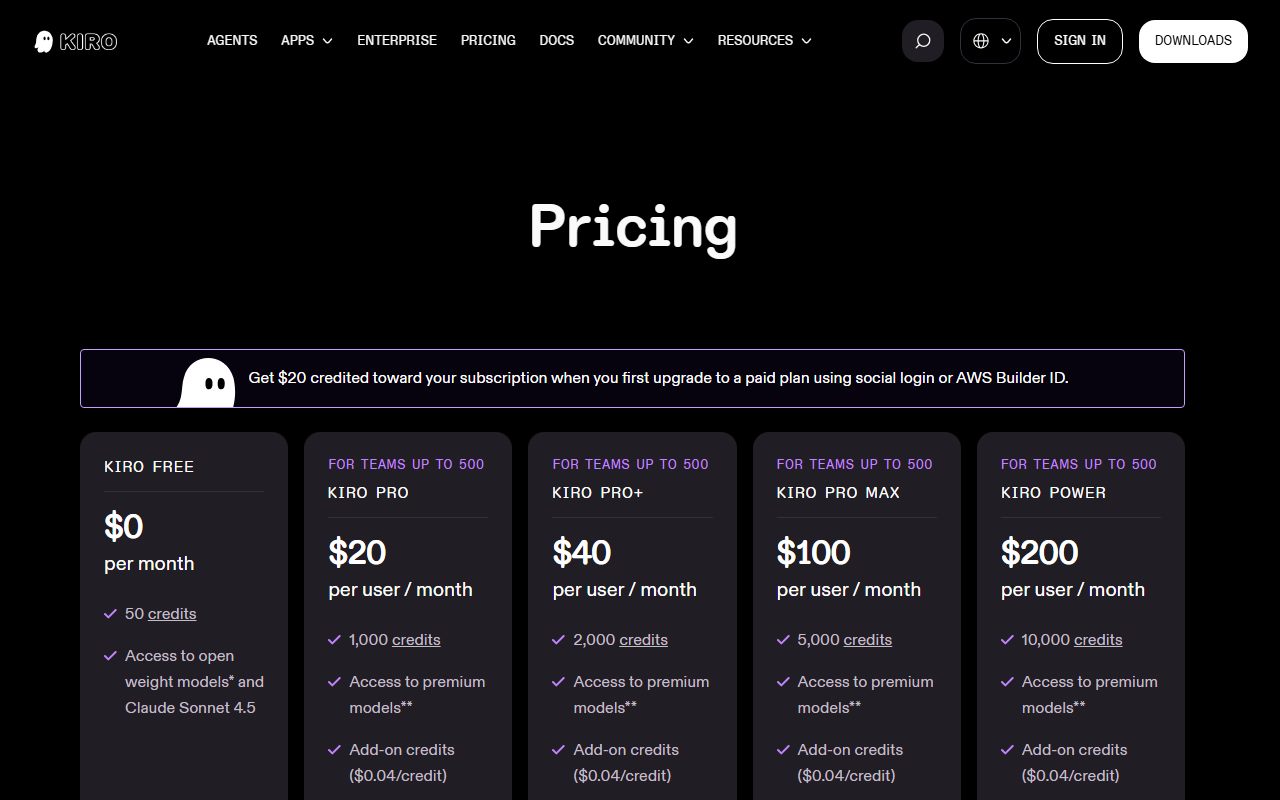
Kiro earns second place by publishing everything Cursor does not. The pricing page checked October 10, 2026 lists Free at 50 credits a month, Pro at $20 per user for 1,000, Pro+ at $40 for 2,000, Pro Max at $100 for 5,000 and Power at $200 for 10,000, with add-on credits at $0.04 each in packs from $5. Credits do not roll over; add-ons expire after 12 months.
The FAQ explains the unit. A credit is a unit of work; simple prompts consume less than one, spec tasks typically more; a task costing X credits in Auto costs 1.3X on Sonnet 4.6; metering is to the second decimal. That is more than either rival says about its own unit.
The editor is built on Code OSS and imports VS Code settings, themes and Open VSX plugins. Spec mode, which produces requirements, a design and a task list before code is generated, is the distinctive feature and suits teams that review plans more comfortably than diffs. Model choice spans OpenAI, Anthropic and open-weight families.
The weaknesses are structural. Each developer subscribes individually, so credits are not pooled below Enterprise. Enterprise is bought and billed through AWS, with centralised billing, SSO and analytics held there. No support commitments are published. Content from the Free tier and social-login users may be used for service improvement unless they opt out; paid users on IAM Identity Center or an external identity provider are excluded. And we found no verified-review listing of any size.
Why it sits at #2. Kiro is as legible as Copilot and, as an agent-first editor, more capable for delegated work. It loses the top spot on pooling and governance: a ten-person team cannot share allowances, and SSO and analytics require an AWS enterprise relationship. It sits above Cursor because a stated $20 for 1,000 credits beats an unstated $40.
Read our full Kiro review.
Best agent toolset, hardest to budget: Cursor
Cursor has the best features score in this cluster and finishes third. The pricing page checked October 10, 2026 lists an agent, cloud agents, Bugbot code review, MCP servers, skills, hooks, automations with shared team context, a team marketplace and a model router with three cost modes. Teams Standard at $40 per user adds SAML and OIDC SSO, team-wide privacy mode and usage analytics; Enterprise adds SCIM, audit logs, pooled usage and granular access controls.
The privacy documentation is the clearest here. With privacy mode on, Cursor says customer data is not used for training and that it holds zero-data-retention agreements with all providers. Admins can enforce it team-wide. With it off, Cursor may use and store code and prompts to train its models.
The pricing documentation is the least clear. No plan states an included usage amount in dollars or requests. On-demand usage continues after the included amount and is billed monthly in arrears at model list prices, with a $0.25 per million token surcharge on Auto third-party routes. The vendor's own estimate is $60 to $100 a month for daily agent users and $200 or more for power users. The yearly toggle shows no yearly prices.
Trustpilot shows 1.5 from 342 reviews, 79 percent one-star, with unexpected charges, on-demand usage billed after users believed it was off, plan changes after purchase and automated support the main themes. The profile is unclaimed.
Why it sits at #3. Our rubric weights value and support equally with features, and Cursor's are the lowest in the cluster for reasons the vendor controls: it chose not to publish its allowance. A team that already works through agents and budgets from the $60 to $100 estimate may still be right to buy it. A team deciding whether agentic development suits it should not use an unpublished meter to find out.
Read our full Cursor review. The head-to-head is Cursor vs GitHub Copilot.
Also compared (did not make the cut)
Windsurf would have been the fourth subject. On October 10, 2026 its homepage redirected to devin.ai/desktop and its pricing page to devin.ai/pricing, both of which returned 404 errors. We cannot grade terms we cannot read.
General assistants with coding tools attached are a different category. Claude includes a command-line coding tool on its paid plans and ChatGPT sells a Codex seat billed on usage at the enterprise tier, per our primer on assistant pricing. A team whose coding is occasional may be served by one of those at $20 a seat without a dedicated coding assistant.
How to choose an AI coding assistant for a small team
Start with the editor your developers will not leave. If it is JetBrains, Visual Studio or Neovim, Copilot is the only one of the three that runs there. If it is VS Code, all three are open, and Kiro and Cursor both import your settings.
Decide whether you buy completions or delegation. A team that mostly accepts suggestions gets most of the value from Copilot's unlimited, unmetered completions. A team that assigns tasks to an agent and reviews the result is paying for credits, and should compare the three allowances rather than the three stickers.
Insist on a published allowance. Copilot states 1,900 credits per user; Kiro states 1,000 per developer; Cursor states nothing. If you cannot write the included amount in the budget line, you are not buying a seat, you are opening an account. Unlimited is a pricing word is our longer case.
Model the overage, not the floor. Copilot's $0.01 per credit with an admin budget is the only hard cap here. Kiro's $0.04 add-ons are double its included rate, which argues for upgrading rather than topping up. Cursor's in-arrears billing at model list price has no cap on the pricing page. Ten seats at list are $2,280, $2,400 and $4,800 a year respectively; only the first two numbers are likely to be the real ones.
Set the privacy switch before the first invite. Cursor's privacy mode, Kiro's identity path and Copilot's content exclusion are all controls the admin configures, not defaults the team inherits. Who reads what you type is the general argument; the specific settings are in each subject page.
Plan the exit on the way in. None of the three owns your code, but each holds configuration: Copilot's policies, Kiro's specs, Cursor's rules and automations. The larger cost of leaving is the working pattern a team builds around the tool. The claim that you can always switch explains why that cost is underestimated, and the tool is not the workflow explains why the cheapest seat can still be the most expensive purchase.
Frequently asked
Which AI coding assistant is cheapest for a team of 10? At list, GitHub Copilot Business at $2,280 a year, then Kiro Pro at $2,400, then Cursor Teams Standard at $4,800, all our arithmetic from the pricing pages checked October 10, 2026. Cursor's realistic figure, using the vendor's own $60 to $100 per daily user estimate, is $7,200 to $12,000.
Which one publishes its usage limits? Copilot and Kiro. Copilot states 1,500 credits on Pro and 1,900 per user on Business, with a one-cent overage. Kiro states 50, 1,000, 2,000, 5,000 and 10,000 credits across its plans with four-cent add-ons. Cursor publishes no included amount for any plan.
Which is safest for proprietary code? On paper, Cursor with privacy mode enforced: no training, zero-data-retention agreements with providers, per its privacy overview. Kiro excludes paid IAM-authenticated users from service improvement. Copilot lists IP indemnity and content exclusion, but its trust page could not be read on October 10, 2026.
Do any of them have a usable free plan? Copilot's is the most defined: 2,000 completions and 50 chats a month. Kiro's 50 credits is a short demonstration. Cursor's Hobby plan has no published number. None is a working plan for a professional developer.
Can a general assistant replace a coding assistant? For occasional coding, possibly. Claude's paid plans include a command-line coding tool and ChatGPT sells usage-billed Codex seats at the enterprise tier. ChatGPT vs Claude and what a seat means when the worker is software cover that arithmetic.
Bottom line
Buy GitHub Copilot Business if you want a $19 seat whose cost you can forecast and cap, with governance included, and read GitHub's trust page yourself before signing. Buy Kiro if you are a VS Code team that wants an agent-first editor with a stated meter at $20 per developer and can live without pooling. Buy Cursor if your team already works through agents, budget from the vendor's $60 to $100 estimate, and enforce privacy mode on day one.
Last checked October 10, 2026. What changed: first published. Windsurf excluded because its pricing pages redirected to 404s on that date. Prices and terms above come from the vendors' pages and Trustpilot as read on that date, and may have changed since.
Best default for a small team: GitHub Copilot
GitHub Copilot Business lists $19 per granted seat per month with 1,900 AI credits per user pooled across the organisation, unlimited completions, cloud agent, code review, organisation-wide policy management, audit logs, content exclusion and IP indemnity, per the plans page and plans documentation checked October 10, 2026. Usage beyond the pool is $0.01 per credit and an admin can set a budget. Pro for individuals is $10 with 1,500 credits; the free plan gives 2,000 completions and 50 chats a month. The model catalogue spans Anthropic, OpenAI, Google, xAI and Kimi on every plan. Weaknesses: no annual price, third-party agents held for Pro+ and above, credits-per-request figures unpublished, content exclusion not yet active in VS Code's edit and agent modes, and a trust page we could not read. Overall 4.0.
Visit GitHub Copilot
We have no affiliate relationship with this vendor. Link goes to the official site.
Best for VS Code teams that want a stated meter: Kiro
Kiro, from Amazon Web Services, is an agentic editor built on Code OSS that imports VS Code settings and Open VSX plugins. Its pricing page checked October 10, 2026 states every allowance: Free 50 credits a month, Pro $20 per user for 1,000, Pro+ $40 for 2,000, Pro Max $100 for 5,000, Power $200 for 10,000, add-on credits $0.04 each, no rollover. Spec mode turns a prompt into requirements, a design and a task list before code is written. Paid users on AWS IAM Identity Center or an external identity provider are not used for service improvement, per the FAQ; free and social-login users may be, with an opt-out. Weaknesses: credits are per developer rather than pooled below Enterprise, Enterprise is bought through AWS, no support commitments are published, and no verified-review listing of size exists. Overall 3.9.
Visit Kiro
We have no affiliate relationship with this vendor. Link goes to the official site.
Best agent toolset, hardest to budget: Cursor
Cursor, from Anysphere, is a VS Code fork with the deepest agent feature set in this cluster: agent, cloud agents, Bugbot code review, MCP servers, skills, hooks, automations with shared team context and a model router, per the pricing page checked October 10, 2026. Teams Standard is $40 per user with SAML and OIDC SSO and team-wide privacy mode; Teams Premium is $120 with five times the agent limits; Pro is $20 for individuals. No plan publishes an included usage amount, on-demand usage is billed in arrears at model list prices, and the vendor's own documentation estimates $60 to $100 a month for daily agent users. With privacy mode on, no training and zero-data-retention agreements with providers. Trustpilot shows 1.5 from 342 reviews, mostly billing complaints. Overall 3.6.
Visit Cursor
We have no affiliate relationship with this vendor. Link goes to the official site.
How we chose
We did not run tests of our own; grades come from documentation, pricing pages and verified user reports checked on October 10, 2026. Each tool is scored out of 5 on four pillars, weighted equally.
Ease measures adoption friction: whether the tool fits an existing editor, whether the free plan has stated limits, and how many pages a buyer must read to understand the bill.
Features measures what the pricing page and documentation list: agent capabilities, cloud agents, code review, model choice, and the governance layer at the entry team tier.
Value measures the published price against the published allowance, with heavy penalties for allowances that are not published at all and for overage rates that are missing.
Support measures stated channels and commitments, weighted by what verified reviewers report. Where no review listing exists, we say so.
Where a vendor does not publish a figure, the entry says so rather than estimating.
Frequently asked
Which AI coding assistant is cheapest for a team of 10?
At list, GitHub Copilot Business at $2,280 a year, then Kiro Pro at $2,400, then Cursor Teams Standard at $4,800, our arithmetic from the pricing pages checked October 10, 2026. Cursor's realistic figure, using the vendor's own $60 to $100 per daily user estimate, is $7,200 to $12,000.
Which AI coding assistant publishes its usage limits?
Copilot and Kiro. Copilot states 1,500 credits on Pro and 1,900 per user on Business with a $0.01 overage. Kiro states 50, 1,000, 2,000, 5,000 and 10,000 credits across its plans with $0.04 add-ons. Cursor publishes no included amount for any plan as of October 10, 2026.
Which is safest for proprietary code?
Cursor with privacy mode enforced has the clearest written position: no training and zero-data-retention agreements with providers. Kiro excludes paid users on IAM Identity Center from service improvement. Copilot Business lists IP indemnity and content exclusion, but GitHub's trust page could not be read on October 10, 2026.
Is GitHub Copilot or Cursor better for a small team?
Copilot for most small teams, because its $19 seat has a published allowance, a published overage and governance controls. Cursor has the deeper agent toolset and is the better choice for a team already organised around agents that can budget from the vendor's $60 to $100 per user estimate.
Why is Windsurf not in this guide?
Its homepage and pricing page redirected to devin.ai on October 10, 2026, and the destination pricing page returned a 404. We do not grade products whose current terms we cannot read. It will be added if a readable pricing page appears.
Do these tools offer annual pricing?
None of the three lists an annual price as of October 10, 2026. Copilot shows monthly prices only, Kiro shows monthly prices only, and Cursor shows a yearly toggle without yearly numbers. Yearly totals in this guide are twelve months at list, our arithmetic.