 Talk
Talk
GitHub Copilot
The coding assistant most teams already have a login for, repriced in 2026 from requests to AI credits at one cent each.
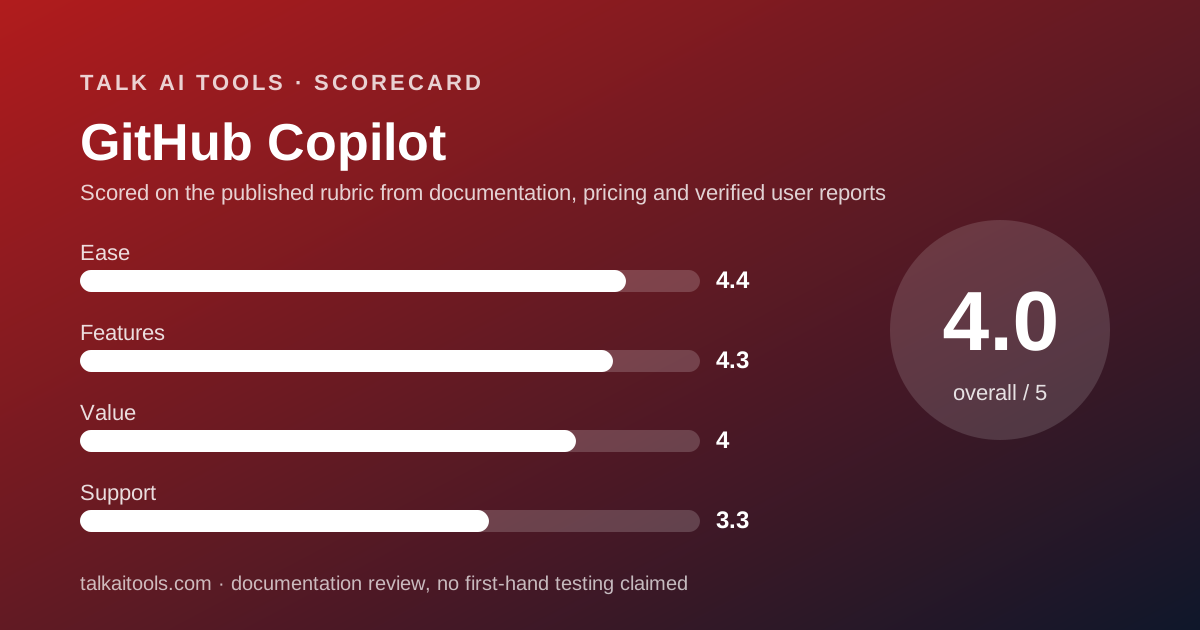
Scored on the published rubric, from documentation, pricing and verified user reports.
Best for: Small teams whose code already lives on GitHub, who want a predictable per-seat bill with a published overage rate, and who value policy controls over the newest editor tricks.
Verdict
GitHub Copilot is the coding assistant for a company that would rather extend a vendor relationship than start one. This is a documentation review: everything here comes from GitHub's plans page, its Copilot features page and its billing and plans documentation as read on October 10, 2026, not from running the product. The 2026 story is the unit of account. Copilot no longer sells premium requests; it sells GitHub AI Credits, with 1 credit equal to $0.01, per the plans page. Pro at $10 a month includes 1,500 credits, Business at $19 per seat includes 1,900 per user, Enterprise at $39 includes 3,900, and usage beyond a pool is charged at $0.01 per credit. That is the clearest overage price in this category. The free plan is real but small: 2,000 inline completions and 50 chat requests a month. The strengths are distribution, a published meter, content exclusion and IP indemnity on Business. The weaknesses are a credit system the docs explain across several pages, no annual pricing on any plan, and third-party agents reserved for Pro+ and above. Copilot earns 4.0 overall.
Visit GitHub Copilot
We have no affiliate relationship with this vendor. Link goes to the official site.
Where it is strong
- Published overage rate: 1 AI credit equals $0.01 and usage beyond the pool is $0.01 per credit, per the plans page and plans documentation checked October 10, 2026
- Business at $19 per granted seat per month includes 1,900 credits per user, unlimited completions, cloud agent, code review, policy controls, content exclusion and IP indemnity
- Free plan needs no card: 2,000 inline completions and 50 chat requests a month, with agent mode and the CLI included
- Same model catalogue on every plan, listing Anthropic, OpenAI, Google, xAI and Kimi models, per the plans page
- Runs inside editors teams already use rather than requiring a new one
Where it falls short
- No annual pricing is listed for any plan; the vendor sells month to month only, per the plans page
- Third-party agents (Claude, OpenAI Codex) are reserved for Pro+ at $39 and above; Pro and Business users do not get them
- The credit model is documented across at least three pages, and the legacy premium-request model still applies to some annual Pro subscribers
- Code review costs 13 requests per run on the legacy meter, which suggests a meaningful credit cost on the new one, though the vendor does not state the credit figure
- The Copilot trust page could not be read on October 10, 2026, so training and retention terms are unverified here
What this subject page is, and is not
This page grades GitHub Copilot on what GitHub publishes: the plans page, the features page, the plans documentation, the billing documentation and the content exclusion documentation, all read on October 10, 2026. We did not run Copilot to produce this page and we make no claim about how its suggestions feel.
The essays on this site argue about what AI tools change. A subject page like this one is the reference the essays lean on: the prices, the limits and the terms, with dates. When a number here ages, the essay that cites it ages too, which is why the date is on every figure.
One gap to declare up front. The Copilot trust page, which GitHub now uses for its training and retention statements, returned no readable text on the day we checked. The privacy section below says what we could and could not verify.
What GitHub Copilot actually is
Copilot is an extension, not an editor. It lives inside VS Code, JetBrains, Visual Studio, Neovim, the GitHub CLI, GitHub Mobile and, on Enterprise, GitHub.com itself. The surface a developer sees is whatever editor they already had, with suggestions, a chat panel and an agent mode added.
That is the structural difference from Cursor, which is a fork of VS Code with the assistant built into the editor's bones. Copilot's bet is distribution: it meets developers where they are and bills through an account the company already pays.
The product has three layers in 2026. Inline completions and next-edit suggestions, which are unlimited on paid plans and not metered. Chat and agent mode in the editor, metered in credits. And a cloud agent, which can be assigned an issue and returns a pull request, also metered.
The model catalogue is the same on every plan, per the plans page checked October 10, 2026: Anthropic, OpenAI, Google, xAI and Kimi models. What changes by plan is how many credits you have to spend on them and whether you get priority access to new ones.
Who GitHub Copilot is best for
Copilot suits teams that prize predictability and administration over the frontier.
- Small companies already paying GitHub who want one more line on the same invoice.
- Teams that need policy controls such as content exclusion and organization-wide settings at $19 a seat.
- Developers who refuse to change editors and want the assistant inside JetBrains or Neovim.
- Finance-minded buyers who want an overage price written down before the first invoice.
- Mixed-skill teams where unlimited completions matter more than agent depth.
Who should skip it
Teams whose whole workflow is agentic, meaning they delegate tasks rather than accept completions, will find Copilot's agent features newer and its editor integration shallower than a tool built for that purpose. Cursor is the obvious alternative, with the billing caveats our review describes.
Teams that want Claude or OpenAI Codex agents inside Copilot on a standard seat should note those are Pro+ and above on the plans page. Business is not listed as including them.
And anyone who wants annual pricing will not find it: every price on the plans page is per month. A company that budgets yearly is budgeting on a monthly list price that GitHub can change, which the shift from requests to credits in 2026 demonstrates.
What the free tier includes (as of October 2026)
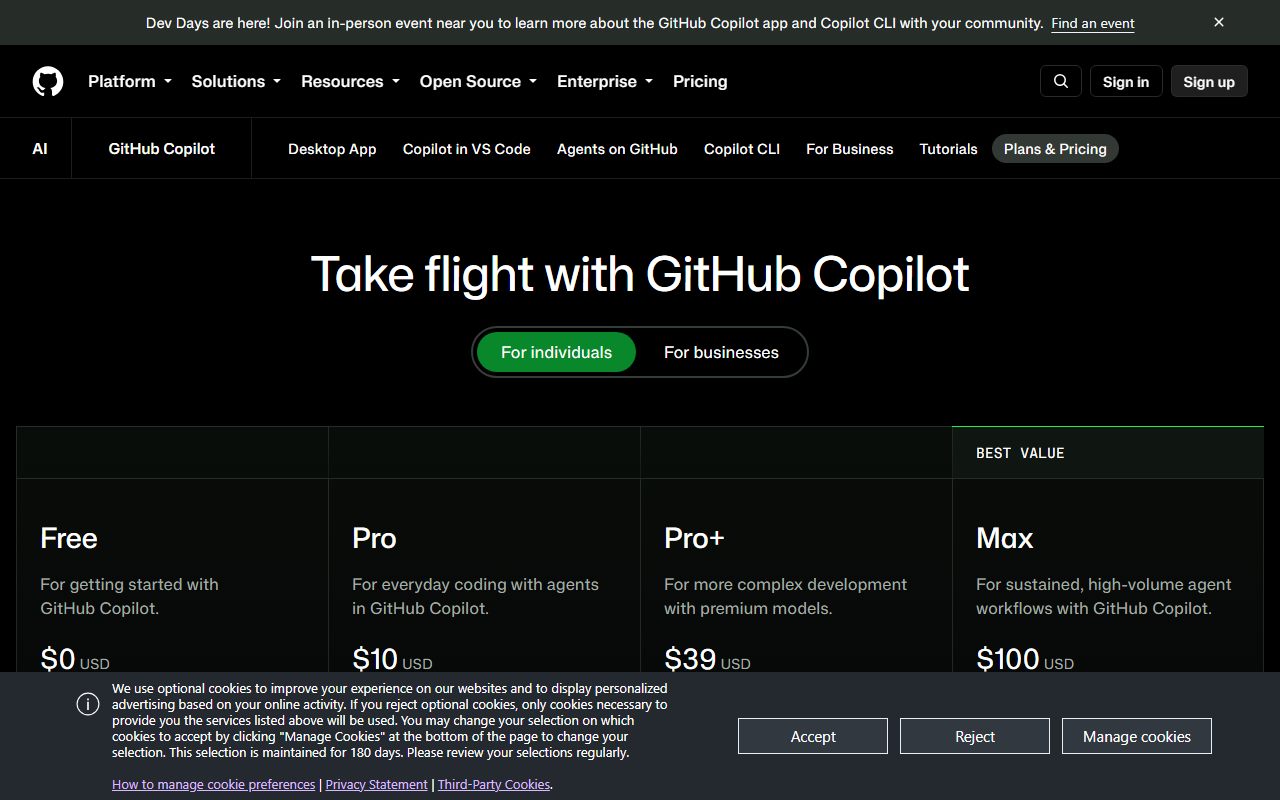
Copilot Free costs nothing and needs no card. The plans page checked October 10, 2026 lists 2,000 inline completions a month and 50 chat requests, including Copilot Edits. Agent mode and the Copilot CLI are included. Cloud agent, code review and third-party agents are not.
The docs describe the allowance as an allowance of GitHub AI Credits without stating a number, and say Free users get auto model selection only. In plain terms: you cannot pick the model, and the chat budget is 50 conversations a month.
Fifty chats is enough to learn what the chat panel does and not enough to work with it. Two thousand completions is a few days of typing for an active developer. Free is a trial with no end date, which is a reasonable thing for a vendor to offer and a poor thing to mistake for a plan.
Verified students get a separate Student plan at no cost with agents included, excluding third-party agents, per the plans documentation.
What sits behind the paywall
Three things change when you pay: completions become unlimited, chat and agent usage move onto a credit meter, and the cloud agent and code review switch on.
Pro at $10 a month includes 1,000 base credits plus a 500 flex allotment, 1,500 in total, per the plans page and plans documentation checked October 10, 2026. It adds the cloud agent, code review and a selection of models. Pro+ at $39 includes 3,900 base plus 3,100 flex, 7,000 total, and adds third-party agents (Claude and OpenAI Codex) and premium models. Max at $100 includes 10,000 plus 10,000, 20,000 total, with priority access.
The docs mark audit logs as included on Pro+ and Max but not on Free or Pro, which is unusual for individual plans and suggests the higher tiers are aimed at consultants and solo founders who need a record.
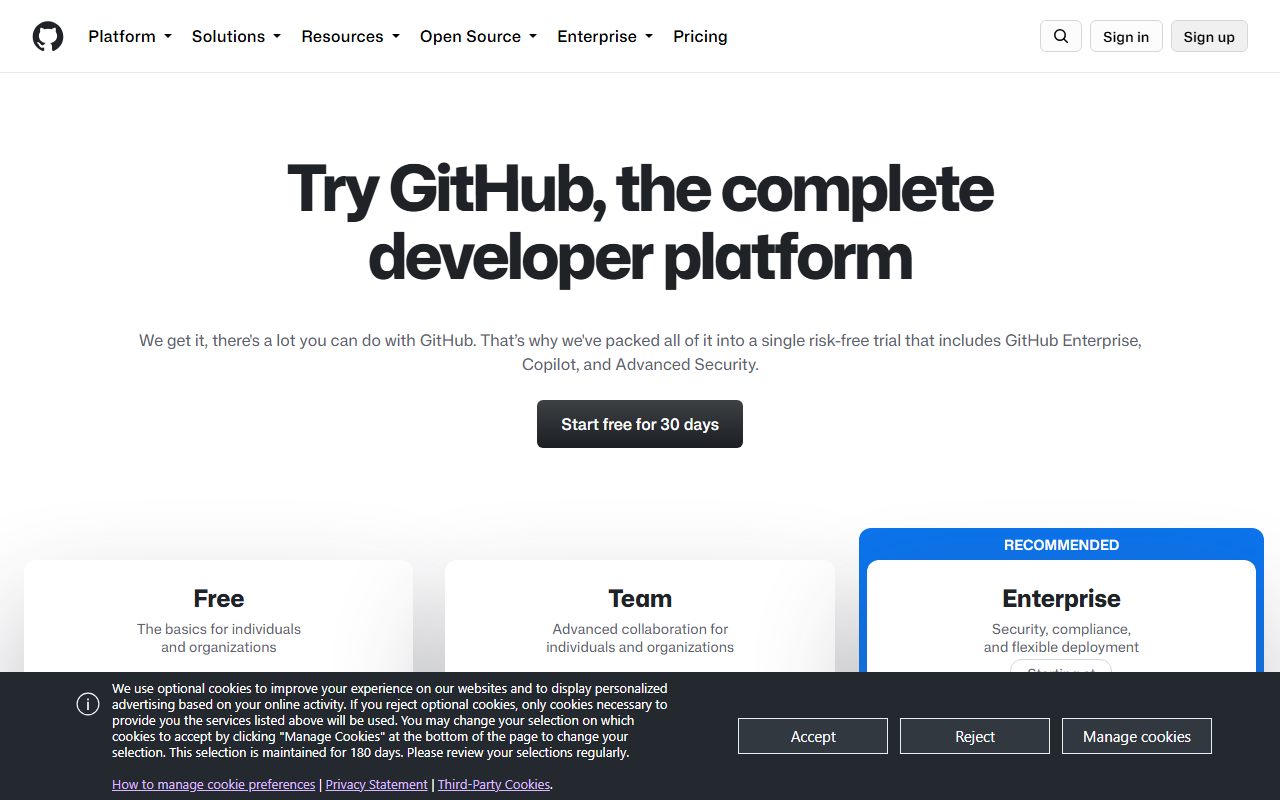
Business at $19 per granted seat includes 1,900 credits per user, unlimited completions, cloud agent and code review, access to premium models and third-party agents per the features page, plus centralised management, policy controls, content exclusion, audit logs, IP indemnity and web-based support.
Enterprise at $39 per seat includes 3,900 credits per user, priority access to new models, a chat interface on GitHub.com, codebase indexing, GitHub Spark and the rest of Business. It requires GitHub Enterprise Cloud and is not available on GitHub Enterprise Server.
One inconsistency to flag: the features page describes Enterprise as including 2,000 more credits per user than Business, while the plans documentation states 3,900 per user. The two figures agree (1,900 plus 2,000), but the pages phrase it differently.
How the pricing is structured for a company
The unit is the granted seat, billed monthly, and there is no minimum stated. A two-person company pays $38 a month for Business. Ten people pay $190 a month, $2,280 a year by our arithmetic. Twenty pay $380 a month, $4,560 a year. GitHub lists no annual discount, so the yearly figures are simply twelve months at list.
Each seat adds its credits to a shared pool, per the plans documentation checked October 10, 2026. Ten Business seats pool 19,000 credits a month. A quiet developer's unused credits cover a busy one's overrun, which is the single most useful feature of the pricing for a small team.
When the pool is exhausted, usage beyond it is charged at $0.01 per AI credit. The plans page puts it the other way round: a $10 budget covers 1,000 credits, and with a budget set Copilot continues without interruption. An administrator sets the budget; without one, the docs for the legacy model say paid features pause until the next month.
What the vendor does not publish is how many credits a given request costs. The legacy documentation gives the shape: a chat prompt was one premium request multiplied by a model rate, a code review was 13 requests, a cloud agent session was one request plus one per steering comment. The credit equivalents are not on the pages we read, so budgeting is still an estimate.
The legacy model matters for one group. Pro and Pro+ subscribers on an existing annual plan who stayed on request-based billing after June 1, 2026 still get 300 and 1,500 premium requests a month, with extra requests at $0.04 each, per the requests documentation. New subscribers are on credits.
For the full arithmetic of what a seat means when it includes a metered agent, our essay on seats and software workers applies to Copilot as much as to chat assistants. Copilot's version is cleaner than most: the seat is $19, the meter is one cent, and both numbers are on the page.
Ease of use: what the 4.4 is built from
Copilot's ease score is about friction removed, not interface polish. The free plan needs no card. The paid plans are bought in a GitHub account most teams already have. The extension installs into editors developers already run. There is no new tool to learn before the first suggestion appears.
The docs say agent mode and the CLI are on every plan including Free, so the newer ways of working are not gated behind a sales call.
We took points off for the billing documentation. Understanding what a seat buys required the plans page, the features page, the plans documentation and the legacy requests page, and they do not all use the same words. A buyer who wants to know what a code review costs in credits will not find it.
For a team adopting any assistant, the first weeks are about habits more than features. The tool is not the workflow is our argument for why the cheapest seat can still be the most expensive purchase.
Features: what the 4.3 is built from
The paid feature list is complete for a team assistant: unlimited completions and next-edit suggestions, chat, agent mode, a cloud agent that opens pull requests, code review, a CLI, and a catalogue spanning five model vendors, per the plans page checked October 10, 2026.
The administrative features are what lift the score. Content exclusion lets repository administrators, organization owners and enterprise owners keep named files out of suggestions, chat and code review on Business and Enterprise, per the content exclusion documentation. Organization-wide policy management and audit logs are included on both business plans.
The gaps are at the frontier. Third-party agents are Pro+ and above for individuals. Edit and agent modes in VS Code's chat do not yet honour content exclusion, per the same documentation, which is a real hole for a team that chose Business for that feature. And Copilot remains an extension, so the deep editor integration a purpose-built tool offers is not available.
On balance Copilot's feature set is broad, governed and a half-step behind the specialists. For many small companies that is the right trade.
Value: what the 4.0 is built from
Copilot Business is the easiest seat in this category to put in a budget. Nineteen dollars, 1,900 credits, one cent per credit after that. Against Cursor Teams at $40 per user with no published usage amount, or Kiro at $20 per user with 1,000 credits and $0.04 add-on credits, Copilot's entry price and its overage rate are both the lowest with a number attached.
The value score stops at 4.0 for three reasons. No annual pricing means no price protection. The credits-per-request figures are not published, so the one-cent rate is precise about the unit and vague about the quantity. And the free plan's 50 chats a month is small enough that most evaluations will need a paid month.
The 2026 switch from premium requests to credits is itself a value signal. The legacy overage was $0.04 per request; the new one is $0.01 per credit. Whether that is cheaper depends entirely on how many credits a request costs, which is the figure the vendor does not publish. Unlimited is a pricing word covers why unit changes deserve suspicion.
Support: what the 3.3 is built from
The features page lists web-based support on Business and priority access to new models and features on Enterprise. The plans page does not define response times for any tier, and individual plans get the help documentation and community forum.
There is no Copilot-specific Trustpilot listing. The github.com listing, checked October 10, 2026, shows 1.8 from 280 reviews, but its themes are account suspensions, support responsiveness and billing for GitHub as a whole; Copilot appears in only a handful of reviews, one complaining about the move to usage-based billing and one praising it for enterprise work. We do not treat that score as a Copilot score.
We grade support at 3.3: documented at the enterprise end, thin and undefined for the $19 seat most small companies will buy.
What users report
Copilot has no dedicated verified-review listing with meaningful volume that we could read on October 10, 2026. The github.com Trustpilot page covers the platform, not the assistant, and its 280 reviews mention Copilot rarely.
Where Copilot does appear in that listing, the two themes are the ones this page already flags: unhappiness with the shift to usage-based billing, and satisfaction with the product itself from an enterprise engineer who could not speak to support. We did not read G2 or Capterra for this page.
We would rather say the evidence is thin than borrow a score from a page about something else.
Limits stated by the vendor
The hard limits on the plans page and plans documentation checked October 10, 2026 are the credit allowances (1,500, 7,000, 20,000 for individuals; 1,900 and 3,900 per user for business plans), the free plan's 2,000 completions and 50 chats, and the plan gates on cloud agent, code review and third-party agents.
Two softer limits matter. Content exclusion does not yet apply in VS Code's edit and agent modes. And on the legacy request model, once the allowance is used the docs say response times may slow and requests may be rate limited even on included models; the credits documentation we could read does not say whether the same applies.
Copilot is not available on GitHub Enterprise Server, and Pro or Pro+ subscriptions bought through GitHub Mobile on iOS or Android cannot buy additional requests, per the requests documentation.
Privacy and data use
What we can verify: the features page lists IP indemnity and data privacy as Business features; the content exclusion documentation describes how administrators keep files out of suggestions, chat responses and code review; and the plans documentation mentions zero data retention through the end of 2026 for approved enterprises on certain Anthropic models.
What we cannot verify: GitHub's current statement on whether prompts and suggestions from Business and Enterprise users are retained or used for training. The site-policy privacy statement for Copilot Business now redirects to a trust page that returned only a title when we fetched it on October 10, 2026.
We will not fill that gap from memory. A buyer should read the Copilot trust page directly before signing, and should treat the Business plan's content exclusion feature as a control they configure rather than a default they inherit. Who reads what you type is our general argument for why this section matters more than the feature list.
Alternatives
Cursor. Choose Cursor if your team works agentically all day and wants an editor designed around that, and if you can tolerate a $40 Teams seat with no published usage amount and a Trustpilot score of 1.5. Otherwise choose Copilot for the published meter and the admin controls. The full comparison is Cursor vs GitHub Copilot.
Kiro. Choose Kiro if you want spec-driven development, a VS Code-compatible editor and a flat $20 seat with 1,000 credits, and if your company is comfortable buying through AWS at the enterprise tier. Otherwise choose Copilot if GitHub is already your system of record.
A general assistant. For a team whose coding is occasional, a general assistant such as ChatGPT or Claude at $20 a seat may cover the need without a dedicated coding seat; our primer on assistant pricing sets out that arithmetic. All three coding tools are ranked in the best AI coding assistants for small teams.
Bottom line
GitHub Copilot is the coding assistant you buy when you want the bill to be boring. Nineteen dollars a seat, 1,900 credits, one cent per credit beyond, policy controls and content exclusion included, all inside an account you already administer. For most small companies on GitHub that is the sensible default.
It is not the most ambitious editor, it has no annual price, its credits-per-request figures are unpublished, and its training statement could not be read on the day we checked. Teams that want the frontier should read our Cursor review; teams that want certainty on data should read GitHub's trust page before they read ours.
This is a documentation review built from GitHub's pages as of October 10, 2026. Prices and limits may have changed since.
Visit GitHub Copilot
We have no affiliate relationship with this vendor. Link goes to the official site.