 Talk
TalkCursor vs GitHub Copilot: which suits a small team
Short answer: GitHub Copilot is the better buy for a small team that wants a predictable bill and administrative control, because Business costs $19 per seat with 1,900 pooled AI credits and a published overage of $0.01 per credit. Cursor is the better buy for a team of experienced developers who work through agents all day and can budget for usage the vendor does not quantify; Teams Standard is $40 per user. This comparison is built from both vendors' pricing pages and documentation, Cursor's privacy overview and Trustpilot, all checked October 10, 2026, not from running either product. Our full Cursor review and GitHub Copilot review have the plan-by-plan detail.
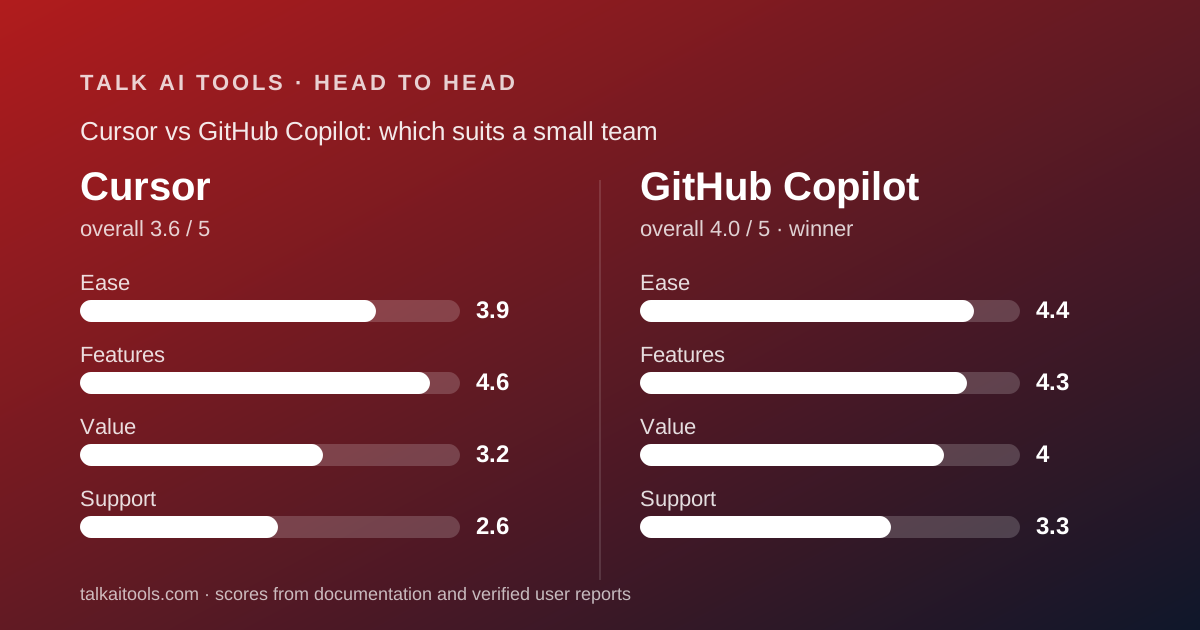
 3.6Cursor
 4.0GitHub Copilot
The short answer
Two tools that answer the same question with opposite priorities.
- Cursor is best for teams of experienced developers who delegate whole tasks to an agent, already live in VS Code, and can absorb a monthly bill that varies.
- GitHub Copilot is best for teams that want a fixed seat price, pooled credits, a published overage, policy controls and no change of editor.
- Winner for most small teams: GitHub Copilot, because its pricing can be put in a spreadsheet and Cursor's cannot. Cursor has the deeper feature set, and a team that has already reorganised around agents may rightly choose it anyway.
How this comparison was made
We read Cursor's pricing page, pricing documentation, Teams documentation, security page, privacy overview and privacy policy; GitHub's Copilot plans page, features page, plans documentation, requests documentation and content exclusion documentation; and both Trustpilot listings, all on October 10, 2026. We did not run either product.
Each tool is scored out of 5 on ease, features, value and support, weighted equally; the pillar scores are those from the two full subject pages. Annual totals and team costs on this page are our arithmetic from published monthly prices, since neither vendor publishes an annual price.
Where a vendor does not publish a figure, the table says so. That happens more often in Cursor's column, and that asymmetry is itself a finding.
Copilot is easier to adopt; Cursor is easier to go deep in
Copilot wins the first week. It installs into the editor a developer already uses, bills through a GitHub account the company already administers, and has a free plan with stated limits: 2,000 completions and 50 chats a month, per the plans page checked October 10, 2026. Nobody changes tools to try it.
Cursor asks for a switch. It is a fork of VS Code, so for a VS Code team the switch is small and settings import; for a JetBrains or Neovim team it is a migration. Its Hobby plan is free with no card but publishes no numeric limit, so the trial has an unknown length.
Once adopted, Cursor is the more coherent environment. The agent, cloud agents, Bugbot, MCP servers, skills, hooks and automations are listed on one pricing page as parts of one product. Copilot's equivalent features are spread across plan tiers, with third-party agents held for Pro+ and above and content exclusion not yet working in VS Code's edit and agent modes.
Our ease scores are 4.4 for Copilot and 3.9 for Cursor. The gap is adoption friction and billing legibility, not interface quality, which we did not assess. The tool is not the workflow is our argument that the switch cost is usually underestimated in both directions.
Pricing: Copilot costs less and, more importantly, costs a known amount
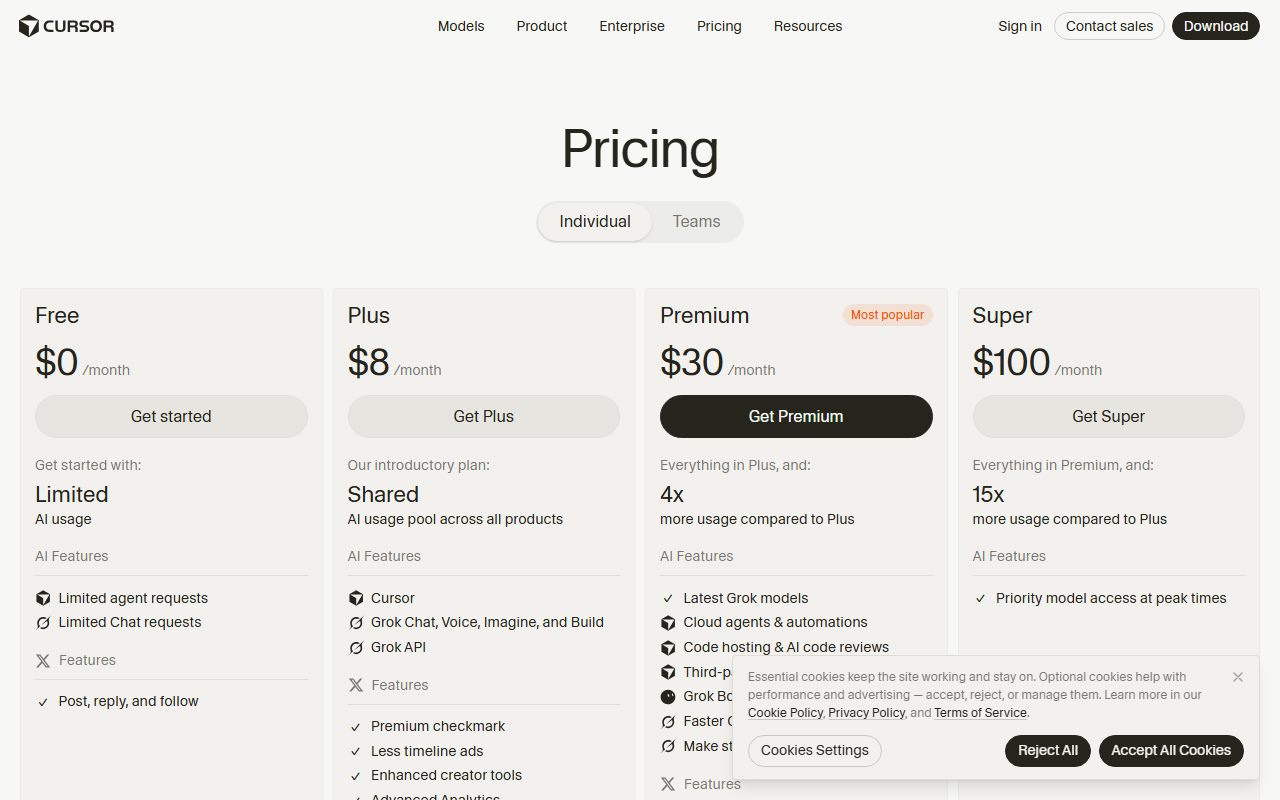
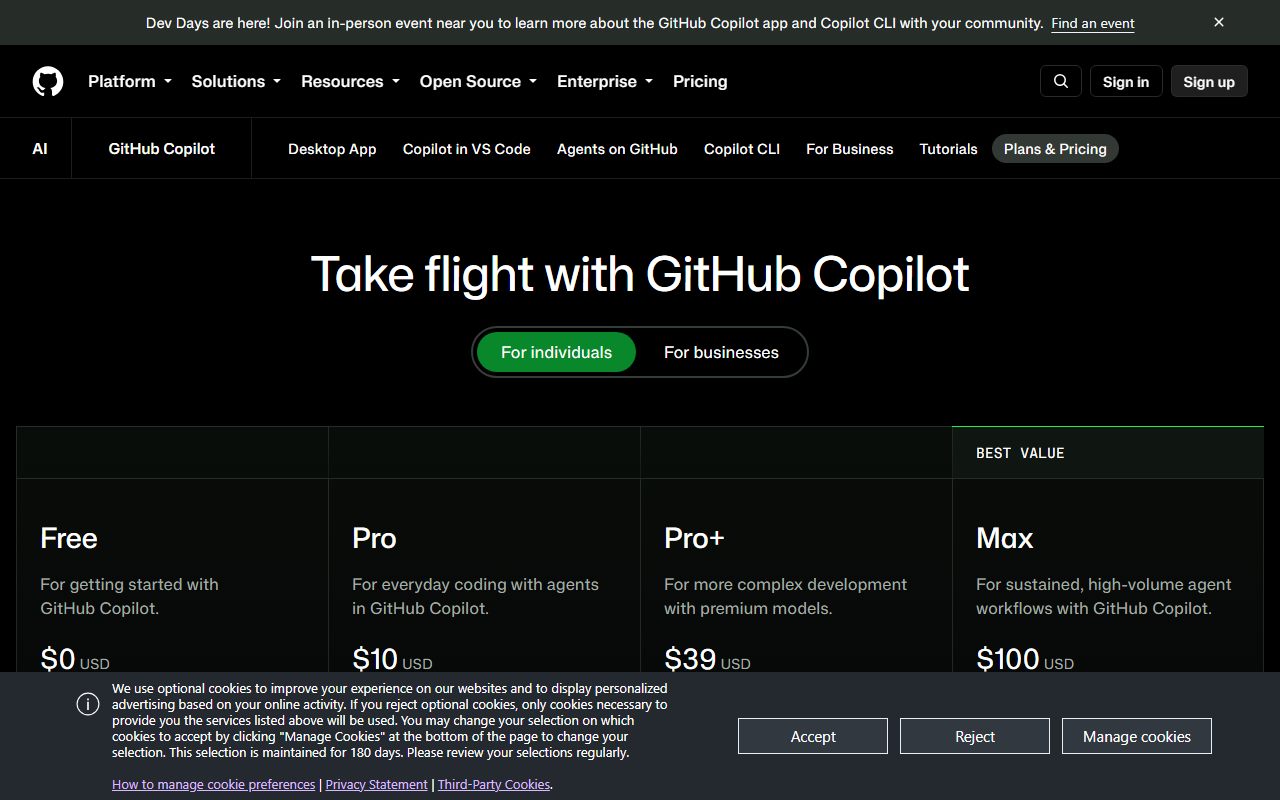
At list, Copilot Business is $19 per seat and Cursor Teams Standard is $40 per user, per both pricing pages checked October 10, 2026. For ten people that is $2,280 a year against $4,800, by our arithmetic. For twenty, $4,560 against $9,600.
Those are floors, and the two floors behave differently. Copilot's $19 includes 1,900 AI credits per user, pooled across the organisation, with usage beyond the pool at $0.01 per credit, per the plans documentation. Ten seats pool 19,000 credits; a $10 budget adds 1,000. An administrator can cap the overage in advance.
Cursor's $40 includes an amount the vendor does not state. The pricing documentation gives no dollar or request figure for any plan, says on-demand usage continues after the included amount and is billed monthly in arrears at model list prices, and adds a $0.25 per million token surcharge when Auto routes to third-party models. Its own estimate is that daily agent users typically spend $60 to $100 a month in total and power users $200 or more.
Apply the vendor's estimate to a ten-person team and the Cursor range is roughly $7,200 to $12,000 a year, against a Copilot figure that starts at $2,280 and rises by one cent per credit beyond the pool. Even if Copilot's credits-per-request cost, which GitHub does not publish, turns out high, the overage is capped by a budget the admin sets.
Neither vendor publishes an annual price. Cursor shows a yearly toggle without yearly numbers; Copilot shows monthly prices only. A company budgeting a year is, with both, budgeting on a list price the vendor can change, and both vendors changed their usage models in 2026.
Individuals pay $20 for Cursor Pro and $10 for Copilot Pro, with Copilot stating 1,500 credits and Cursor stating extended limits. The same asymmetry at half the price. What a seat means when the worker is software is the longer version of this section.
Features: Cursor lists more; Copilot governs more at the entry price
On the agent side Cursor is ahead. Its pricing page checked October 10, 2026 lists cloud agents, Bugbot code review, MCP servers, skills and hooks, automations with shared team context, a team marketplace for internal rules and plugins, and a model router with Cost, Balance and Intelligence modes. Copilot's plans page lists agent mode, a cloud agent that opens pull requests, code review and a CLI, with third-party agents on Pro+ and above and GitHub Spark on Enterprise.
On the governance side the comparison depends on tier. Cursor puts SAML and OIDC SSO and team-wide privacy mode on its $40 Teams plan, and holds SCIM, audit logs, pooled usage and repository, model and MCP access controls for Enterprise. Copilot puts organisation-wide policy management, audit logs, content exclusion and IP indemnity on its $19 Business plan.
For a small company the entry tier is what matters, and at the entry tier Copilot's controls are broader while Cursor's agent is deeper. A team buying for compliance leans Copilot; a team buying for throughput leans Cursor.
Two caveats cut against each. Copilot's content exclusion does not yet apply in VS Code's edit and agent modes, per its documentation, which weakens the feature where agentic teams use it most. Cursor's Max Mode is available only on legacy plans, and the differences between Pro, Pro Plus and Ultra are not described beyond allowance size.
Our features scores are 4.6 for Cursor and 4.3 for Copilot. Both are the top two in this cluster; Kiro trails on breadth and leads on clarity.
Support: thin on both sides, documented worse at Cursor
Neither vendor publishes response times for small-team plans. Copilot's features page lists web-based support on Business and priority access on Enterprise. Cursor's pricing page lists priority support with account management on Enterprise and nothing for Hobby, Pro or Teams.
The public record differs sharply. Cursor's Trustpilot listing, checked October 10, 2026, shows 1.5 from 342 reviews with 79 percent one-star, and reviewers describe AI-driven support that is hard to get past. Trustpilot notes the profile is unclaimed. Copilot has no listing of its own; the github.com listing at 1.8 from 280 reviews is about the platform and rarely mentions Copilot.
We score support at 2.6 for Cursor and 3.3 for Copilot. The difference is mostly that Copilot's silence is backed by GitHub's existing enterprise support machinery and Cursor's is not.
What users report, side by side
Cursor's 342 Trustpilot reviews as of October 10, 2026 are dominated by billing: unexpected charges, on-demand usage billed after users believed it was off, plan changes after purchase, limits that run out faster, refund disputes, then lockouts and automated support, then product complaints about agents ignoring instructions and lost chats. The 9 percent five-star reviews praise speed and output quality.
Copilot has no dedicated listing with volume. In the github.com listing, Copilot appears in a handful of reviews: one cancelled over the shift to usage-based billing, one found it created more problems than it solved, one enterprise engineer found it very useful. We do not treat the github.com score as a Copilot score.
The evidence is asymmetric and we say so. Cursor's record is bad and specific; Copilot's is largely absent. Trustpilot does not fact-check reviews, and we did not read G2 for this page.
Privacy: Cursor has written the answer down; Copilot's page could not be read
Cursor's privacy overview, checked October 10, 2026, is the clearest statement in this cluster. With privacy mode on, customer data is not used for training, Cursor holds zero-data-retention agreements with all providers so model providers will not store or train on your data, and briefly cached files are never permanently stored. With privacy mode off, Cursor may use and store codebase data, prompts, editor actions and code snippets to train its models.
Admins can enforce privacy mode team-wide; the pages do not say whether it is on by default.
Copilot's plans and features pages list IP indemnity and data privacy on Business and describe content exclusion, and the plans documentation mentions zero data retention on certain Anthropic models for approved enterprises through 2026. GitHub's detailed training and retention statement lives on a trust page that returned no readable text when we fetched it on October 10, 2026. We cannot quote it, and we will not reconstruct it from memory.
For a buyer the difference is operational. With Cursor, the protection is a switch an admin flips before the first invite. With Copilot, the protection is a vendor statement the buyer must read directly, plus a file-level exclusion feature that does not yet cover every mode. Who reads what you type is our general case for making this section decisive.
Switching between them is cheap in code and expensive in habits
Neither tool owns your code. Both read repositories you already hold, and neither pricing page describes proprietary project files that would be lost on exit. What each stores is configuration: Cursor's rules, skills and team marketplace entries; Copilot's organisation policies and content exclusion lists.
The real switching cost is the working pattern. A team that has built its day around Cursor's agent, cloud agents and automations will find Copilot's agent mode familiar but its surrounding toolset thinner. A team that has built policy and audit around Copilot Business will find Cursor's equivalents on Enterprise, at a custom price.
Billing exits differ. Cursor bills per active user with proration and on-demand usage in arrears, so the last invoice arrives after the last month. Copilot's seats are granted and revoked in the GitHub organisation and credits do not carry over. The claim that you can always switch covers why the editor switch in particular takes longer than it looks.
Running both is plausible: Copilot Free in the editor for completions, Cursor Pro for the developers who delegate. The combined floor for a ten-person team with three Cursor seats is $60 a month plus whatever Cursor's on-demand usage adds.
Choose Cursor if
Cursor is the right pick when the agent is already how your team works.
- Your developers delegate tasks and review diffs - cloud agents, Bugbot, hooks and automations are the product.
- You are a VS Code team - the switch is small and settings import.
- You want SSO and enforced privacy mode on a self-serve plan - both are on Teams at $40.
- You can budget from the vendor's $60 to $100 per user estimate, not from the sticker.
Choose GitHub Copilot if
Copilot is the right pick when the bill and the controls matter more than the frontier.
- Your code is on GitHub - seats, policy and billing live in an account you already administer.
- You need the monthly number before the month - $19, 1,900 pooled credits, $0.01 per credit beyond, budget cap set by the admin.
- You need content exclusion, audit logs and IP indemnity at the entry price - all listed on Business.
- Your developers use JetBrains, Visual Studio or Neovim - Copilot is an extension; Cursor is an editor.
Bottom line
GitHub Copilot wins for most small teams because it is the one of the two whose cost a finance lead can write down: $19 a seat, 1,900 pooled credits, one cent per credit beyond, with policy controls and IP indemnity included. It is a half-step behind on agent depth and its training statement could not be read on the day we checked, which a buyer should fix by reading GitHub's trust page before signing.
Cursor is the stronger product on paper and the harder purchase. If your team already works through agents, buy it, budget from the vendor's own spend estimate, and enforce privacy mode before the first invite. If you are still deciding whether agentic development suits you, do not use a $40 seat with an unpublished meter to find out.
The third option, Kiro, sits between them: a VS Code-compatible agentic editor with a published credit count at $20 per developer. All three are ranked in the best AI coding assistants for small teams. For general assistants rather than coding tools, ChatGPT vs Claude is the companion page.
This is a documentation comparison. Every price and policy above comes from the vendors' pages and Trustpilot as read on October 10, 2026, and may have changed since.
Visit Cursor
We have no affiliate relationship with this vendor. Link goes to the official site.
Visit GitHub Copilot
We have no affiliate relationship with this vendor. Link goes to the official site.