 Talk
Talk
Kiro
A VS Code-compatible agentic editor from AWS that writes the spec before the code and prices every plan in credits you can count.
Scored on the published rubric, from documentation, pricing and verified user reports.
Best for: Small teams that want an agentic editor with a credit count on the box, prefer requirements written down before code is generated, and are comfortable with AWS as the vendor behind the enterprise tier.
Verdict
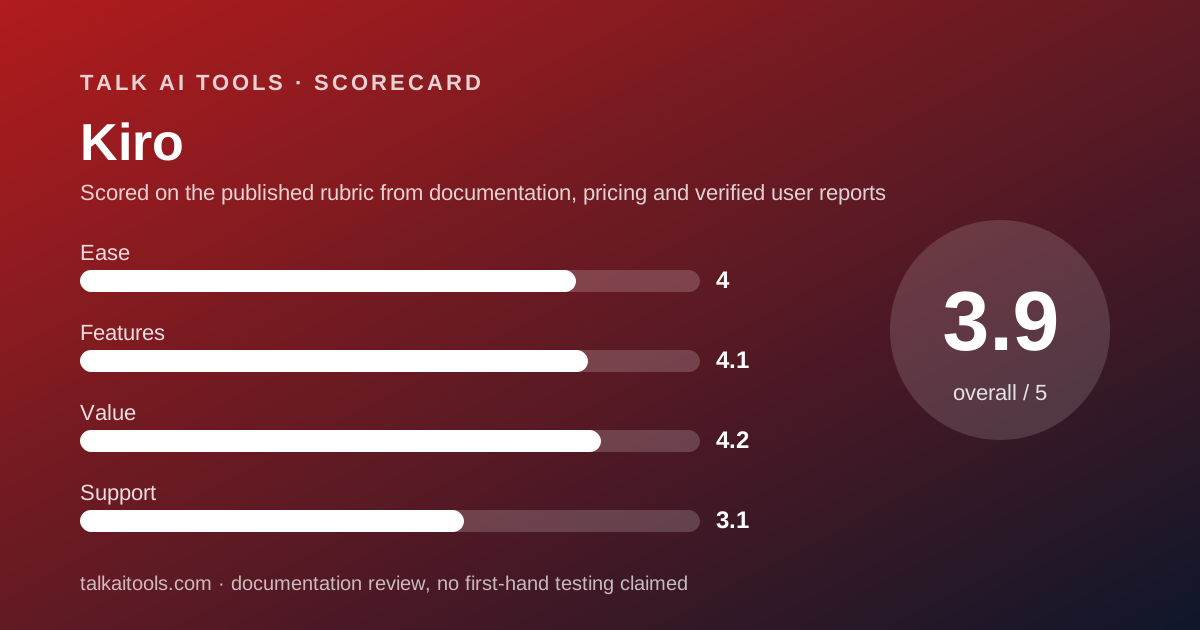
Kiro is the coding assistant for a team that wants the agent to show its plan before it touches the repository. This is a documentation review: everything here comes from Kiro's pricing page and FAQ as read on October 10, 2026, not from running the product. Its distinguishing idea is spec mode, where a prompt becomes requirements, a design and a task list before any code is written, alongside a conventional vibe mode. Its distinguishing commercial fact is that every plan states its credits: Free 50 a month, Pro $20 for 1,000, Pro+ $40 for 2,000, Pro Max $100 for 5,000, Power $200 for 10,000, add-on credits $0.04 each, no rollover. A credit is a unit of work metered to the second decimal, and the FAQ gives a worked example of how models change the rate. The editor is built on Code OSS and imports VS Code settings and Open VSX plugins. The weaknesses are a per-developer subscription model with no self-serve team pool, an enterprise tier that is bought through AWS, a free tier whose content may be used for service improvement unless you opt out, and a vendor that publishes no support commitments. We found no verified-review listing with enough volume to cite. Kiro earns 3.9 overall.
Visit Kiro
We have no affiliate relationship with this vendor. Link goes to the official site.
Where it is strong
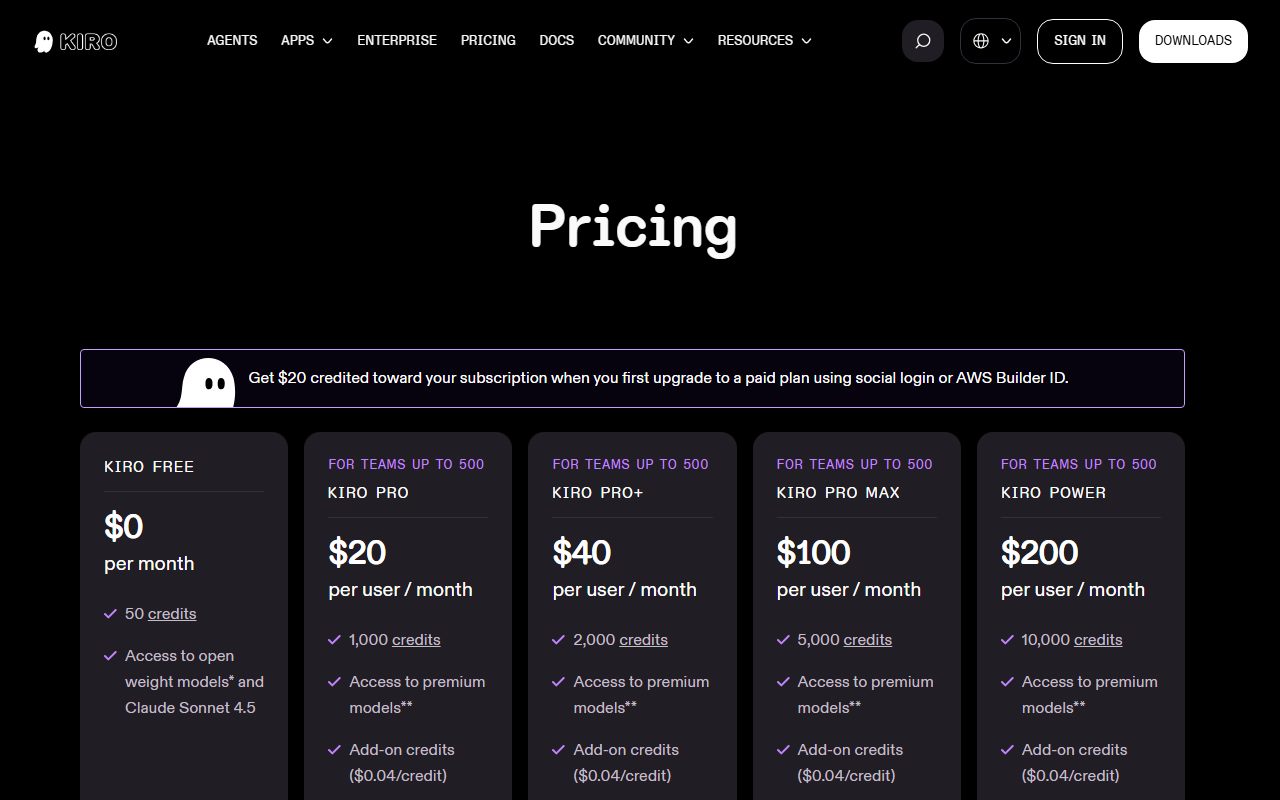
- Every plan publishes its credits: 50, 1,000, 2,000, 5,000 and 10,000 a month, with add-on credits at $0.04, per the pricing page checked October 10, 2026
- Spec mode turns a prompt into requirements, design and tasks before code is generated, a different working style from completion-first tools
- Built on Code OSS with VS Code settings, themes and Open VSX plugins importable during onboarding, per the FAQ
- Paid plans accessed through AWS IAM Identity Center or an external identity provider are not used for service improvement, and no telemetry is collected from them, per the FAQ
- Model choice includes OpenAI, Anthropic and open-weight models, with an Auto mode as default
Where it falls short
- Each developer needs their own subscription; the pricing page describes no pooled team plan below Enterprise
- Enterprise is purchased and billed through AWS, which suits AWS customers and adds a procurement layer for everyone else
- Free tier and social-login content may be used for service improvement unless you opt out, per the FAQ
- Unused monthly credits do not roll over, and add-on credits expire 12 months after purchase
- No support tiers, response times or verified-review listing of meaningful size could be found on October 10, 2026
What this subject page is, and is not
This page grades Kiro on what Amazon publishes: the pricing page and the FAQ, both read on October 10, 2026. We did not run Kiro to produce it, and we found no verified-review listing with enough volume to cite, so the user-report section below is short by design.
Kiro appears in the essays on this site as the counter-example: the agentic editor that chose to publish its meter. This page is the reference for that claim, with the numbers and their date.
Two sources is a thin base, and the page says so where it matters. The data-protection documentation the FAQ refers to was not read for this page; where the FAQ summarises it, we quote the FAQ.
What Kiro actually is
Kiro is a desktop code editor from Amazon Web Services, built on Code OSS, the open-source base of VS Code. During onboarding it imports VS Code settings, themes and Open VSX-compatible plugins, per the FAQ checked October 10, 2026. A VS Code developer opens it and finds the furniture in the same place.
What differs is the working model. Kiro has two modes. Vibe mode is the familiar one: describe a change, the agent makes it. Spec mode is the distinctive one: a prompt becomes written requirements, a design and a task list, and the agent then executes the tasks one by one. The FAQ lists spec refinement, task execution and agent hooks as credit-consuming actions, which tells you they are first-class features rather than afterthoughts.
By default prompts are processed by Auto, an agent that mixes frontier and specialised models. You can pick a specific model instead: the FAQ names OpenAI GPT-5.6 variants, several Anthropic Claude models, and open-weight models including DeepSeek 3.2, MiniMax M2.5, GLM-5 and Qwen3 Coder Next.
Commercially, Kiro is a credit subscription per developer. The pricing page states the credits on every plan and the price of more, which in this category is unusual enough to be the headline.
Who Kiro is best for
Kiro suits teams that want agentic development with the discipline of a written plan and the predictability of a stated allowance.
- VS Code teams that want an agent-first editor without a billing model they cannot read.
- Teams with review discipline who would rather approve a spec than audit a diff.
- Finance-aware small companies that can budget $20, $40, $100 or $200 per developer and know what each buys.
- AWS customers for whom enterprise billing through the existing account is a convenience.
- Developers who want model choice including open-weight models alongside the frontier ones.
Who should skip it
Teams that want credits pooled across people. Below Enterprise, each developer has their own allowance, so a quiet developer's unused 600 credits cannot cover a colleague's overrun. GitHub Copilot Business pools by design.
Teams that want the widest agent toolset today. Cursor's pricing page lists cloud agents, Bugbot code review, MCP servers, hooks and automations with shared team context; Kiro's pricing page and FAQ describe spec mode, vibe mode and agent hooks, and are silent on the rest.
And teams outside AWS that need enterprise controls. Centralised billing, SSO and usage analytics are Enterprise features, and Enterprise is purchased and billed through AWS, per the pricing page. That is frictionless for an AWS shop and a procurement project for anyone else.
What the free tier includes (as of October 2026)
The Free tier includes 50 credits a month, access to open-weight models and Claude Sonnet 4.5 subject to rate limits, per the pricing page checked October 10, 2026. The page describes it as perpetual. Users who sign up with social login or an AWS Builder ID get access to additional open-weight models.
Fifty credits is small, but it is a number. The FAQ says simple prompts can consume less than one credit and a spec task typically more than one, so 50 credits is somewhere between a few dozen simple exchanges and a handful of spec runs. Enough to see the two modes; not enough to work.
The Free tier is not available for Enterprise or for AWS GovCloud regions. And its content may be used for service improvement unless you opt out, which the privacy section below covers.
What sits behind the paywall
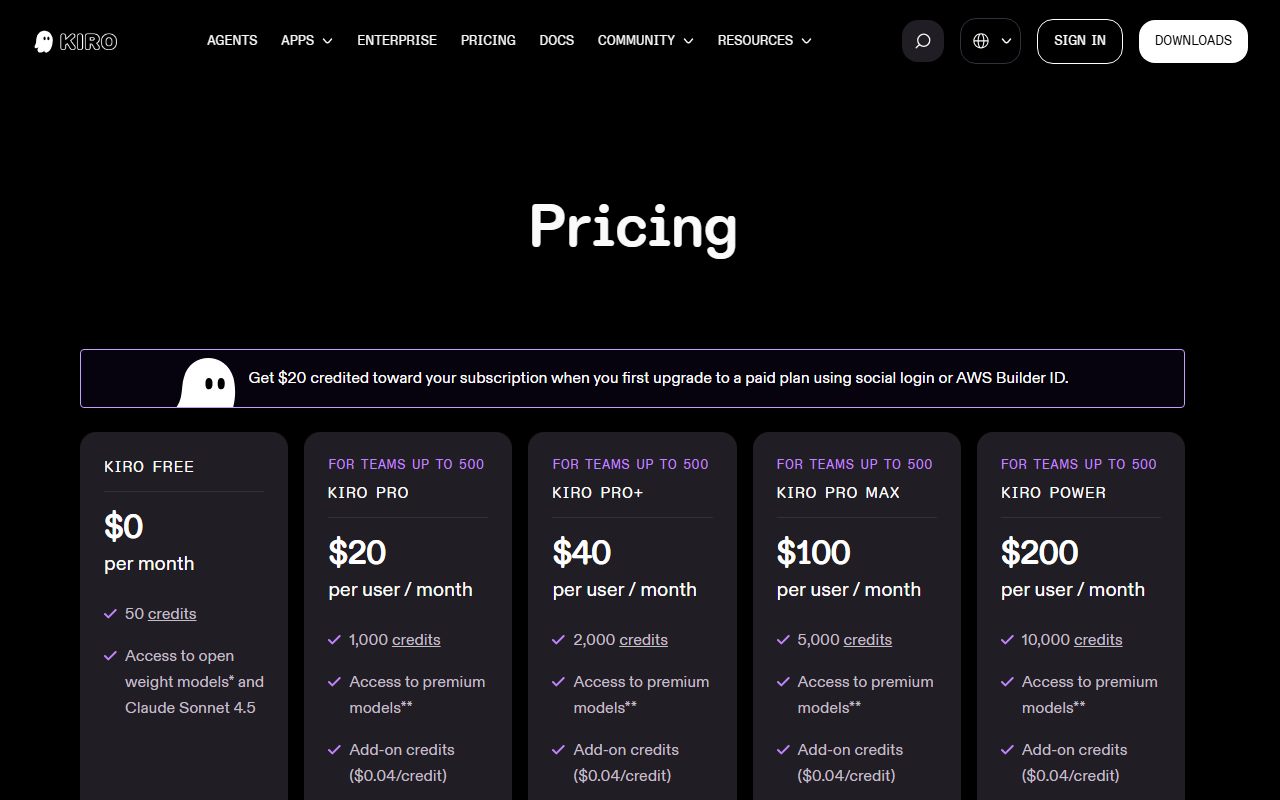
Four paid plans, one shape. Pro is $20 per user per month with 1,000 credits. Pro+ is $40 with 2,000. Pro Max is $100 with 5,000. Power is $200 with 10,000. All four include premium models and the ability to buy add-on credits, per the pricing page checked October 10, 2026.
In plain terms, the price per included credit is the same on every rung: two cents on Pro, Pro+, Pro Max and Power alike. The ladder is linear, which is rare; most vendors in this category charge less per unit at the top. That is our arithmetic.
Add-on credits cost $0.04 each on paid plans, bought in packs from $5 for 125 credits up to $100, and expire 12 months after purchase. Unused monthly credits do not roll over. A first upgrade via social login or AWS Builder ID receives $20 in credit; upgrading requires a valid card.
The pricing page lists Pro through Power as available for teams up to 500, with each developer needing their own subscription. Enterprise adds centralised billing, SSO, usage analytics and enterprise security controls, is bought through AWS, and has overages at $0.04 per credit disabled by default. Organisations above 500 users or with custom needs are directed to sales.
How the pricing is structured for a company
The unit is the developer, billed monthly, and there is no annual price on the page. Ten developers on Pro pay $200 a month, $2,400 a year; twenty pay $400 a month, $4,800 a year. Both are our arithmetic from the pricing page checked October 10, 2026.
Because credits are per developer below Enterprise, the team's effective allowance is the sum of individual allowances with no transfer between them. A team with uneven usage will either over-provision the heavy users or buy them add-on credits at $0.04. Ten developers each buying one $20 pack a month would add $200 a month to the bill.
The FAQ's worked example matters for budgeting: a task that consumes X credits in Auto costs 1.3X on Sonnet 4.6. Different models use credits at different rates, and credits are metered to the second decimal point. A team that standardises on Auto will get more from its allowance than one that pins a premium model.
At the top of the ladder the economics are unambiguous. Power at $200 for 10,000 credits is two cents a credit; add-ons are four cents. A developer who regularly buys more than 2,500 add-on credits a month on Pro Max is better off on Power. That is a calculation the pricing page lets you make, which is the point.
Prices exclude taxes, GovCloud is about 20 percent higher, and Japanese billing addresses attract consumption tax, per the page. What a seat means when the worker is software describes the general drift toward metered seats; Kiro is the version where the meter has numbers painted on it.
Ease of use: what the 4.0 is built from
Kiro removes the two usual sources of friction for a VS Code team. The editor imports settings, themes and Open VSX plugins during onboarding, per the FAQ checked October 10, 2026, and the pricing page needs no decoder: five plans, five credit counts, one add-on price.
The free tier needs no card. The first paid upgrade via social login or Builder ID comes with $20 in credit, which effectively makes the first month of Pro free for that group.
We took points off for the identity split. The data-use terms differ depending on whether a user signs in with social login, an AWS Builder ID, IAM Identity Center or an external identity provider, and a small team has to understand that before choosing how to log in. Spec mode is also a different working rhythm, and a team that has not adopted it will initially find it slower than vibe mode.
As with any tool that changes how work is sequenced, the tool is not the workflow: spec mode only pays off if someone reads the spec.
Features: what the 4.1 is built from
Kiro's documented features are a focused set: vibe mode, spec mode with requirements, design and task generation, spec refinement, agent hooks, Auto model routing, and a model list spanning OpenAI, Anthropic and several open-weight families, per the FAQ checked October 10, 2026.
Spec mode is the feature with no direct equivalent on the other two subject pages. Copilot's cloud agent and Cursor's agent both act on a prompt; Kiro's spec mode first writes down what it intends to do and lets the team edit that. For teams that review requirements more comfortably than they review diffs, that is a real difference.
The gaps relative to Cursor are visible on the pricing pages. No cloud agents, no dedicated code-review bot, no MCP marketplace, no team automations are listed. Relative to Copilot, there is no pooled allowance and no content exclusion equivalent that the pages describe.
We score features at 4.1: a distinctive core, a credible model list, a VS Code-compatible shell, and a shorter list of surrounding tools than the category leader.
Value: what the 4.2 is built from
Kiro's value score is the second-best in this cluster because every number a buyer needs is on the page. Twenty dollars buys 1,000 credits; more costs four cents each; the FAQ explains how models change the rate. A small company can model its bill before it signs.
Against GitHub Copilot Business at $19 with 1,900 credits and a one-cent overage, Kiro's credits are fewer and its add-ons more expensive per unit, but the two credits are different units and neither vendor publishes a per-request cost, so the comparison is between two legible ladders rather than a ranking. Against Cursor, which publishes no allowance at all, Kiro is simply more honest.
The score stops at 4.2 for three reasons. No annual price. No pooling below Enterprise, which makes a team's effective cost higher than the sum of its stickers. And add-on credits at $0.04 are double the included rate, so a team that routinely exceeds its allowance is paying a premium for not upgrading.
Unlimited is a pricing word argues for preferring a stated cap to an unstated promise. Kiro is the clearest case on this site of a vendor taking that advice.
Support: what the 3.1 is built from
The pricing page and FAQ, checked October 10, 2026, describe no support tiers, no response times and no help channel beyond the documentation for any plan. Enterprise is routed to AWS sales. That is less than Copilot's web-based support on Business and about the same as Cursor's silence below Enterprise.
We found no Trustpilot or similar verified-review listing for Kiro with enough reviews to quote. A new product from a large vendor often has that gap, and we would rather leave the section thin than cite a handful of entries.
Support scores 3.1: AWS's enterprise support machinery exists for customers who buy that way, and nothing is promised to the $20 developer.
What users report
No verified-review listing with meaningful volume could be found for Kiro on October 10, 2026. We did not read developer forums for this page because unverified posts do not meet the bar we apply to the other subject pages.
What the vendor's own FAQ implies about user concerns is informative. It answers, at length, how credits are consumed, whether content is used for service improvement, and how to import a VS Code setup. Those are the questions a vendor hears most, and they match the three things this page weighs most heavily.
We will add a user-report section when a listing exists.
Limits stated by the vendor
The published limits as of October 10, 2026 are the credit allowances (50, 1,000, 2,000, 5,000, 10,000), the $0.04 add-on price, the 12-month expiry on add-on credits, the no-rollover rule for monthly credits, the rate limits on the Free tier, the 500-user ceiling on self-serve plans, and the Free tier's unavailability in Enterprise and GovCloud.
The FAQ adds that credits are metered to the second decimal, that the minimum charge is 0.01 credits, and that model choice changes consumption. The vendor does not publish a per-request credit cost for any specific action beyond the general statement that spec tasks typically cost more than one credit.
Privacy and data use
Kiro's data-use position depends on how you log in, and the FAQ checked October 10, 2026 is explicit about it. Content from Pro, Pro+, Pro Max and Power users accessed through AWS IAM Identity Center or an external identity provider is not used for service improvement, and no telemetry is collected from those users. Enterprise admins can configure user activity reports.
Content from the Free tier and from social-login or AWS Builder ID subscribers may be used for service improvement. Those users can opt out of content collection at any time through the mechanism in the data-protection documentation, which we did not read for this page.
The practical rule for a small company: decide the identity path before the first developer signs up. A team that onboards through social login for convenience has accepted a different default from one that sets up IAM Identity Center first, even on the same paid plan.
Retention periods are not stated in the FAQ; it refers to the data-protection documentation. Who reads what you type is our general argument; Kiro's version is that the answer is written down and conditional on a login choice most teams make without thinking.
Alternatives
GitHub Copilot. Choose Copilot if your code is on GitHub, you want pooled credits across a team at $19 a seat with a one-cent overage, and your developers will not leave their editor. Otherwise choose Kiro for a VS Code-compatible agentic editor with a stated per-developer allowance and spec mode.
Cursor. Choose Cursor if you want the deepest agent toolset and self-serve SSO at $40 a user, and can budget for usage the vendor does not quantify. Otherwise choose Kiro if a published credit count matters more than the extra tools. The two tools Kiro sits between are compared directly in Cursor vs GitHub Copilot.
A general assistant. Teams whose coding is occasional may be served by a general assistant such as Claude or ChatGPT at $20 a seat; our primer on assistant pricing has the arithmetic. All three coding tools are ranked in the best AI coding assistants for small teams.
Bottom line
Kiro is the agentic editor that tells you what it will cost. Twenty dollars for 1,000 credits, four cents for more, a worked example of how models change the rate, and a data-use policy that depends on a login choice the FAQ spells out. For a VS Code team that wants to plan before it generates, that combination is hard to beat at the price.
It is per-developer rather than pooled, enterprise means AWS, support is unpromised, and the surrounding toolset is shorter than Cursor's. Teams that need pooling should read our Copilot page; teams that need the full agent toolkit should read our Cursor page and its billing caveats.
This is a documentation review built from Kiro's pricing page and FAQ as of October 10, 2026. Prices and terms may have changed since.
Visit Kiro
We have no affiliate relationship with this vendor. Link goes to the official site.